SaaS Reporting: What to Track and Where AI Can Help

Revenue was up last month. That’s good news, but before you plan around another month of growth, you’ll want to know what drove it. Did more customers sign up, or did existing customers upgrade? Were those gains spread across several accounts, or mostly down to one?
You probably have the information to answer those questions, just not all in one place. Your billing software records subscription changes, your CRM holds customer history, and your product analytics shows how people use the product. SaaS reporting brings those details together so you can understand what’s happening and decide where to focus.
In this guide, we’ll cover which metrics to include, where to find them, and how often to review them. We’ll work through a sample report, then show where automation and AI can help with preparation and analysis, and what your team still needs to check.
Table of Contents
- Choose the SaaS reporting metrics your business needs
- Decide how often to review each metric
- Make your reporting data consistent
- Build a SaaS report your team can use
- Work through a SaaS reporting example
- Use automation and AI to support reporting
- Keep the reporting process useful as the business changes
Choose the SaaS reporting metrics your business needs
Start with the questions the report should answer: is recurring revenue growing, are customers leaving, are existing customers staying and expanding, and are new users reaching an important first step in the product? Add others, such as failed payments, when they’d change a decision or flag a problem.
Core SaaS reporting metrics
| Metric | Definition or calculation | Likely source |
|---|---|---|
| MRR movement | Recurring subscription revenue expressed monthly. Closing MRR = opening MRR + new + expansion + reactivation − contraction − churned MRR. |
Billing system |
| Customer gains and losses | Gains are new or reactivated paying accounts. Losses are accounts whose last qualifying paid subscription ended during the period. | Billing system, with the CRM for account details |
| Customer churn and retention | Customer churn = accounts that were paying at the start of the period but are no longer paying at the end ÷ paying accounts at the start. Customer retention = the share of that same starting group still paying at period end, or 1 − customer churn. |
Billing system |
| Revenue churn and net revenue retention | Gross revenue churn = (churned MRR + contraction MRR) ÷ starting MRR. Net revenue retention = ending MRR from the accounts paying at the start of the period ÷ their starting MRR. Exclude revenue from new accounts acquired during the period. |
Billing system |
| Activation | Share of a signup group that completes a defined first step within a set window, such as seven days. | Product analytics |
Customer churn shows how many customers you lost, and gross revenue churn shows how much recurring revenue you lost through cancellations and downgrades. For gross revenue churn, count only losses from accounts paying at the start of the period. Your customer count can stay the same while customers spend less, so label the period and the starting count or MRR behind each figure.
Retention follows the same group of customers from the start of the period to the end. With this customer-retention definition, a customer who was paying at the start, leaves and returns before the period ends counts as retained, so track the cancellation and return separately and check how your reporting tool treats returning customers.
MRR isn’t the same as cash collected or revenue recognized in your accounts. An annual plan paid upfront brings in a year of cash at once, while MRR spreads it across 12 months.
Decide how often to review each metric

A weekly review can include an end-of-week MRR total, weekly cancellations and monthly retention. Label each measure’s period clearly; how often you review a number isn’t necessarily the period it covers.
Choose the cadence based on the question and how much data each period contains. Signups, cancellations and failed payments can change quickly, so weekly counts help you catch problems early. With a small customer base, retention and revenue churn swing too much week to week to read clearly, so a monthly or quarterly view usually tells you more.
Short periods can also hide gradual change. At Storemapper, a store locator app in our portfolio, a decline in trial signups first looked like normal weekly variation. Investigating it led the team to add a monthly dashboard alongside its weekly numbers, because the decline was hard to see one week at a time.
Make your reporting data consistent
Set one reporting cutoff and time zone, for example the last day of the month at 11:59 p.m. Pacific, and note it on the report. If billing exports in UTC and product analytics uses local time, events near the cutoff can land in different periods, and the totals won’t line up.
Decide how you’ll record cancellations. A customer can request a cancellation today while the subscription runs to the end of the paid period. Record the MRR loss when the subscription ends. Count the customer as lost only when their last qualifying paid subscription ends. Track cancellation requests separately as an earlier signal of what’s coming.
Define what counts as a customer. A company with two subscriptions might be one account in the CRM, two subscriptions in billing and several users in product analytics. Pick the unit each metric uses, and decide how you’ll treat test accounts, paused subscriptions and returning customers. Compare activation groups only once each has had the full observation window, such as seven days.
When your tools give different totals, compare the same date range and time zone, then match a sample of accounts by ID across billing, the CRM and product analytics. Check each tool’s inclusion rules, such as whether it counts trials, refunds, test accounts or users who block tracking. The aim is to understand why the numbers differ and which source each metric relies on.
Build a SaaS report your team can use

Keep the summary in the spreadsheet or document your team already uses. Above it, note the reporting period, the cutoff and time zone, when the data was last refreshed and a link to each source report. The same five columns work for a weekly or monthly review:
| Metric and period | Current result | Comparison, trend or target | What needs attention | Next step, owner and date |
|---|---|---|---|---|
| [Metric; snapshot or date range] | [Value and unit] | [Previous period, trend or target] | [Observation or open question] | [Action, owner, review date] |
Keep rows in a consistent order and link to supporting detail. Mark missing data as “not yet available,” not zero, and record “no action needed” where appropriate. This summary supports your review; it doesn’t replace accounting statements.
At SureSwift, being data driven is one of our core values. That includes paying attention to problems that haven’t improved, not just numbers that changed this month. A metric that’s missed expectations for several periods, or an unresolved issue from the previous review, still deserves discussion. A target helps identify a gap, but you’ll need more context to understand its cause and decide what to do.
Work through a SaaS reporting example
Here’s the format applied to a fictional business in a weekly review. It starts the week with 250 paying customers and $50,000 in MRR. One existing customer upgrades, adding $3,000 in MRR, and four customers cancel, removing $2,000. There aren’t any other changes to the paying customer count or MRR, so MRR closes at $51,000 across 246 customers.
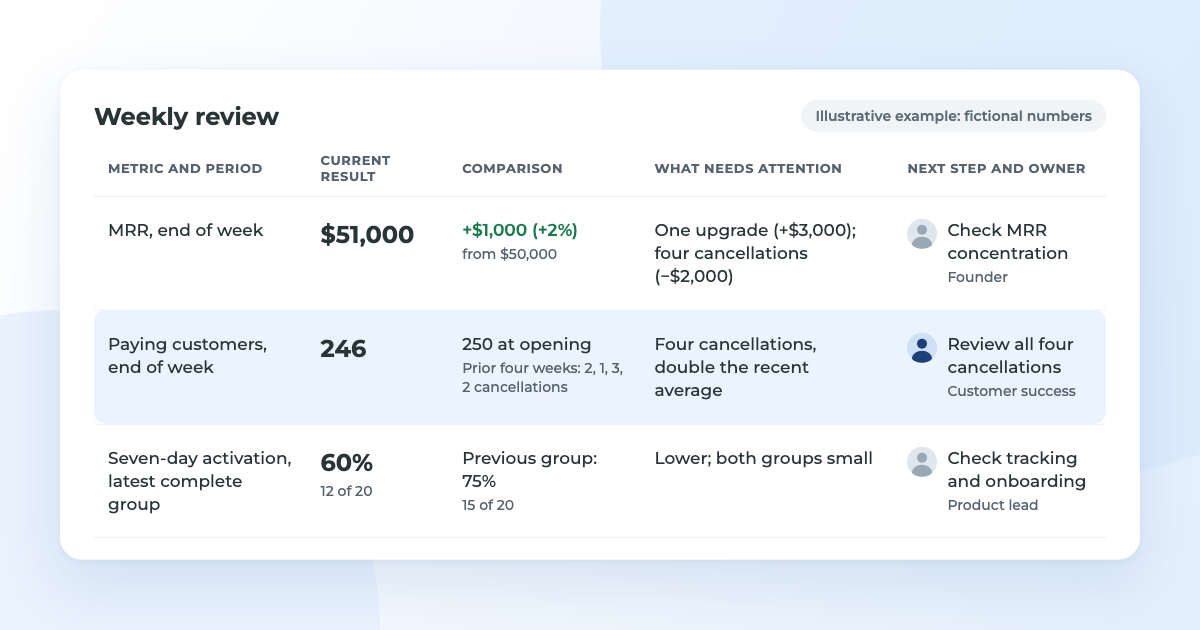
View the example report as text
| Metric and period | Current result | Comparison, trend or target | What needs attention | Next step, owner and date |
|---|---|---|---|---|
| MRR, end of week | $51,000 | +$1,000 (+2%) from $50,000 | One upgrade (+$3,000); four cancellations (−$2,000) | Check MRR concentration; founder; next weekly review |
| Paying customers, end of week | 246 | 250 at opening; prior four weeks: 2, 1, 3, 2 cancellations | Four cancellations, double the recent average | Review all four cancellations; customer success; next weekly review |
| Seven-day activation, latest complete group | 12 of 20 (60%) | Previous group: 15 of 20 (75%) | Lower; both groups small | Check tracking and onboarding steps; product lead; next weekly review |
What the numbers suggest
MRR rose 2%, but one account’s expansion accounted for the increase. Meanwhile, cancellations were double the recent weekly average and activation fell. These changes deserve a closer look, but the report doesn’t establish that they’re connected.
Customer losses. The four cancelled accounts averaged $500 in MRR each, compared with $200 across the business at the start of the week. Check their plans, time as customers, usage and cancellation feedback for a shared pattern. Failed payments and long-standing customers leaving over a product issue require different responses. Keep unknown reasons marked as unknown.
Activation. Twelve of 20 accounts activated, compared with 15 of 20 in the previous group. Confirm that tracking worked throughout both seven-day windows, then check where accounts stopped in onboarding and whether the signup source changed. With groups this small, the difference alone doesn’t establish a trend.
Turn the findings into follow-up
AI can help organize the review, particularly when you have several reporting periods or many customer comments. Provide the checked figures, metric definitions and reporting periods, then try this prompt:
“Summarize what changed in this report. Separate findings from possible explanations, and list the information needed to investigate each change. Don’t invent cancellation reasons or treat two small activation groups as proof of a trend.”
Check the suggestions against the source information before assigning work. In this example, the founder checks how much revenue depends on the upgraded account, customer success reviews the cancellations, and the product lead checks activation. All three report back at the next weekly review. A confirmed onboarding fault should be addressed sooner.
Use automation and AI to support reporting
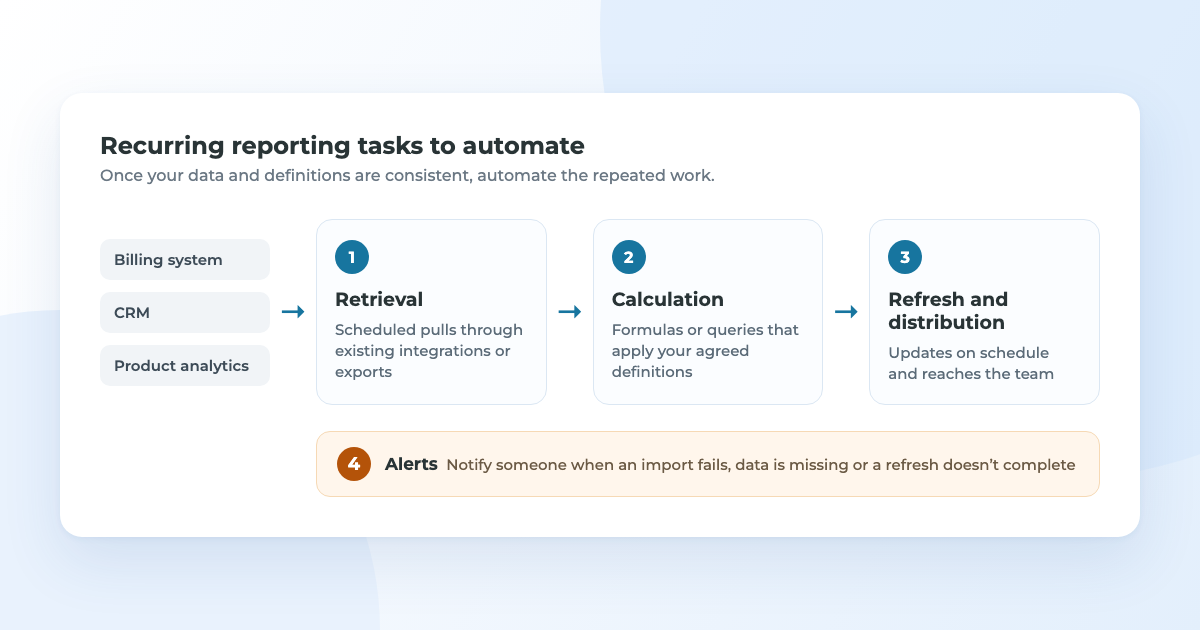
Once your data and definitions are consistent, you can automate much of the repeated preparation and use AI to help with parts of the analysis. That leaves more time to investigate changes, talk to customers and follow through on what the report shows.
Preparing the report. Scheduled integrations or exports can collect data from billing, the CRM and product analytics. Formulas or queries can calculate the metrics, and scheduled delivery can send the report to the team. Set up alerts for failed imports or refreshes so an outdated report doesn’t go unnoticed.
Start with one report that already works manually. Compare the automated output with figures you’ve checked against the source for a few periods before relying on it, and show a timestamp so readers know how current the data is.
Helping interpret the results. AI can group cancellation feedback into themes and compare customer segments. Ask it to show which figures or comments support each observation so you can check them against the source, and keep unclear reasons marked as unknown rather than forcing every comment into a category.
Supporting follow-up. After the team has reviewed the findings, AI can turn them into a draft action list. Give it the agreed actions, owners and dates. If a detail hasn’t been decided, leave it marked as “to confirm.”
Use a tool your company has approved for the data you’re sharing. Connecting AI to billing or analytics systems takes setup and ongoing checks. If you’re curious about how AI agents can handle recurring work, read our overview of OpenClaw.
Keep the reporting process useful as the business changes
Automating repeated exports, calculations and report delivery can give your team more time to talk to customers, improve onboarding and investigate what’s changing in the business. Someone should still be responsible for checking the report and sorting out differences between tools, but they shouldn’t have to rebuild it every week.
When you change pricing, add a plan or switch billing systems, check whether it affects the calculations and explain anything the team needs to know when comparing periods.
To learn more about SureSwift and our approach to owning and growing businesses, get to know our team.
.png)
We partner with founders of profitable businesses to deliver strong exits and a lasting home for your product, team, and customers. Learn more.
Related articles
.png)

OpenClaw, AI Agents, and the Future of SaaS Work
AI agents are starting to move from side experiments into the flow of real work. OpenClaw shows what that shift can look like for SaaS founders and their teams: where agents can help, how to choose the right use cases, and why guardrails matter.