
OpenClaw, AI Agents, and the Future of SaaS Work

If you have spent any time in developer communities or on tech Twitter lately, you have probably seen the OpenClaw hype in full swing. People are building apps from their phones, spinning up AI agents to run tasks in the background, and showing off workflows that would have sounded unrealistic a year ago.
The hype can be noisy, but there is a practical reason SaaS founders are paying attention: AI is starting to execute work, not just help people think and write. That changes what agentic AI can mean inside a software business.
It also changes the risk. Once an AI agent can touch real systems, the way you design the workflow matters just as much as the model powering it. Access, permissions, approvals, and audit trails determine whether an agent becomes useful leverage or an unnecessary liability.
Today’s article looks at what OpenClaw is, where it can create value for SaaS founders and their teams, and how to think about deploying AI agents with enough structure to keep people in control.
Table of Contents
- What is OpenClaw?
- How OpenClaw supports the work teams already do
- How SureSwift evaluates AI agent use cases
- AI agent security: How to use OpenClaw safely
- Takeaways: The next era of software
What is OpenClaw?

OpenClaw helps teams connect AI models to tools and workflows so agents can gather context, prepare actions, and complete approved tasks. It’s an open-source, local execution engine that turns a large language model into an agent that can take action. A standard chatbot can answer questions, summarize text, and write drafts. OpenClaw connects that model to tools like files, APIs, databases, Slack, email, calendars, terminals, and internal docs so it can work through real tasks.
A helpful way to think about it is as a secure command centre. The AI model is the analyst sitting at the desk. It can reason, summarize, write, and decide what information it needs. OpenClaw is the command centre around that analyst. It controls which tools are available, which keys can be used, what data can be accessed, and which actions require approval.
If someone asks a marketing question in Slack, OpenClaw can pull the right campaign data, check the relevant docs, send that context to the model, and return a useful answer. If the workflow allows it, the agent might also draft a report, update a file, or prepare a message for approval.
The AI is no longer sitting outside the business giving generic advice. It can operate inside the workflow, with the right context and the right controls.
How OpenClaw supports the work teams already do
OpenClaw creates value in three practical ways: it connects to your internal context, it meets people in the channels where work already happens, and it can move from suggestion to action once the right guardrails are in place.
The first piece is context. Standard LLMs know a lot about the internet, but they do not know your customers, your pricing, your support history, your product usage patterns, or the decisions your team made last quarter. OpenClaw can work closer to that proprietary business context by reading internal docs, pulling live data from tools like Stripe or HubSpot, checking product analytics, and bringing that information into the task before the model responds.
That matters because most SaaS work depends on context. A renewal brief is only useful if it includes real account history. A support summary is only useful if it understands the customer’s plan, recent tickets, and product usage. A marketing report is only useful if it reflects the actual campaigns, benchmarks, and goals the team cares about.
The second piece is where the work happens. If every AI workflow requires someone to open another app, remember another login, and copy information into another interface, adoption will be limited. OpenClaw can be triggered through the channels teams already use, whether that is Slack, email, a terminal, or an internal workflow. The agent can sit closer to the moment of need instead of becoming one more dashboard.
The third piece is execution. This is the biggest shift from traditional AI tools. OpenClaw can do more than explain what should happen next. With the right permissions, it can prepare the next step, update a record, draft a response, create a ticket, run a report, or call an API. For sensitive workflows, that action should still pause for human approval. But even then, the agent has already done the work of gathering context and preparing the action.
That is where the leverage comes from. OpenClaw is not valuable because it adds AI to a workflow. It is valuable because it can reduce the distance between information, decision, and action.
How SureSwift evaluates AI agent use cases
At SureSwift Capital, we look at OpenClaw through a practical lens: where can agents help our software business units move faster without creating unnecessary risk?
One useful way to think about this is by separating generic agents from specialized agents. Generic agents are best for high-volume, lower-risk work like pulling weekly metrics, summarizing internal updates, organizing documentation, or routing simple support requests. They are valuable because they remove recurring administrative work that otherwise eats into a team’s week.
Specialized agents are different. These are built around a narrower workflow where business context matters. A support agent, for example, should understand the product, common customer issues, escalation rules, and relevant documentation. A reporting agent should understand the metrics that matter, the cadence of the business, and how the team interprets performance. The narrower the workflow, the easier it is to give the agent useful context without giving it unnecessary access.
To decide where agents belong, we also use a simple assessment matrix that compares business functions against potential agent capabilities. The goal is to separate useful workflows from high-impact or high-risk ones. An agent that helps organize internal files may save time, but an agent supporting finance, legal, or M&A workflows needs a much higher bar for permissions, review, and oversight.
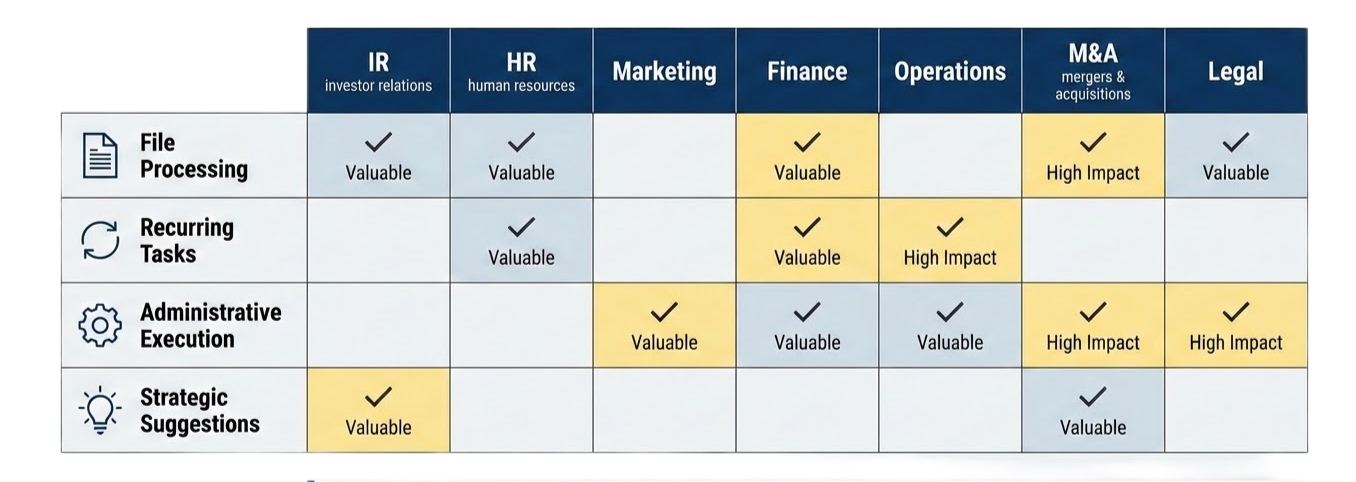
This keeps the strategy grounded. We are not deploying AI because it is exciting. We are looking for the places where the workflow is clear, the data is available, the risk is understood, and the expected return is obvious.
AI agent security: How to use OpenClaw safely
Security needs to be part of the plan from the beginning. The more access you give an AI agent, the more helpful it can be. But more access also means more risk if something goes wrong.
That is what makes agents different from chatbots. If a chatbot gives a bad answer, someone can usually catch it and move on. If an agent has access to customer records, billing tools, files, or internal systems, a mistake can create a real business problem.
One AI agent security risk to understand is prompt injection. This happens when an agent reads something, like a support ticket, email, uploaded file, or web page, that includes hidden instructions meant to trick it. For example, someone could try to tell the agent to ignore its normal rules, share private information, delete files, or take an action it should not take.
The easiest way to manage that risk is by setting up a few simple guardrails.
- Strict sandboxing: Keep agents in controlled environments instead of giving them open access to important systems. That way, if something goes wrong, the damage is limited.
- Scoped permissions: Give the agent only the access it needs. If it is preparing a HubSpot report, read-only access may be enough. If it is reviewing billing issues, it may need to identify failed payments but not issue refunds.
- Human approval: Require a person to approve sensitive actions before they happen, especially customer messages, billing changes, financial content, legal content, or updates to important records.
- Audit logs: Keep a record of what the agent accessed, what it changed, and who approved the action. This makes it easier to review decisions and improve the workflow over time.
The goal is to give the agent a safe lane to work in, so teams can get the benefits without taking on unnecessary risk.
Takeaways: The next era of software
OpenClaw is a useful signal for where AI agents are heading. The real opportunity is software that can help carry work forward across the systems teams already use.
For SaaS founders, the best place to start is practical. Choose one internal workflow, keep the scope narrow, and make sure the agent has clear limits before expanding what it can do.
- Start with the workflow. The workflow is the moat, not the model.
- Keep the first use case narrow. Begin with one internal process where the data, risk, and expected value are easy to understand.
- Build guardrails early. Use scoped permissions, human approval, and audit logs before expanding what the agent can do.
The strongest approach is practical and measured. Use AI agents to make everyday work faster, clearer, and easier to manage, while keeping people responsible for judgment, approvals, and accountability.
At SureSwift, we’re continuing to explore how AI agents can help software businesses operate with more speed, context, and control. Follow along as we test, build, and share what we’re learning across our portfolio.
.png)
Related articles
.png)

.jpg)
Conversion rate optimization for SaaS: What actually works in 2026 (and beyond)
SaaS conversion rate optimization has moved beyond button tests and landing page tweaks. Here’s how modern teams can improve acquisition, activation, and retention by focusing on user intent, faster time-to-value, and smarter full-funnel decisions.
